Swopi AI writes a draft follow-up email for a lead. Nothing is sent by itself: you check the text and send it from your own email.
#Write a follow-up
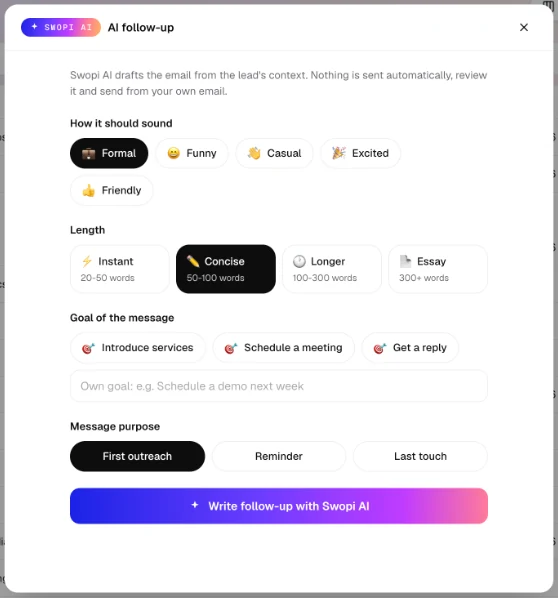
- On the Contacts page, open the lead and click Follow-up. Or open the ⋮ menu on the row and choose Send Swopi AI follow-up.
- Pick How it should sound: 💼 Formal, 😄 Funny, 👋 Casual, 🎉 Excited or 👍 Friendly.
- Pick the Length: ⚡ Instant (20 to 50 words), ✏️ Concise (50 to 100), 🕐 Longer (100 to 300) or 📄 Essay (over 300).
- Pick the Goal of the message: Introduce services, Schedule a meeting or Get a reply. Or type your own, for example Schedule a demo next week.
- Pick the Message purpose: First outreach, Reminder or Last touch.
- Click Write follow-up with Swopi AI.
You can write a follow-up for a lead that has an email address.
#What to do with the draft
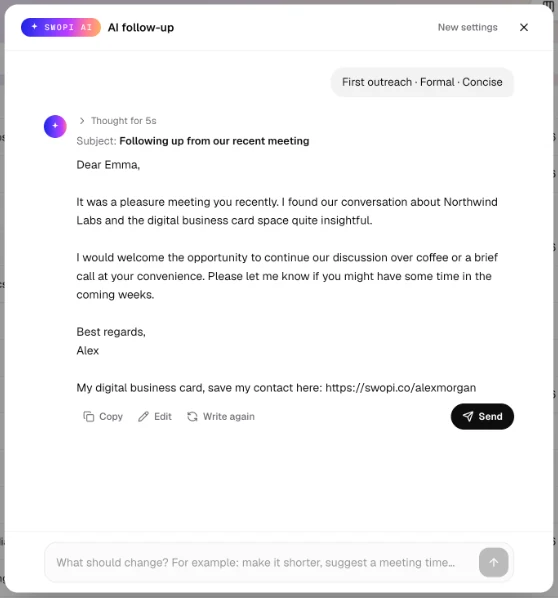
- Copy copies the subject and the text.
- Edit lets you change the text by hand.
- Write again makes a new version.
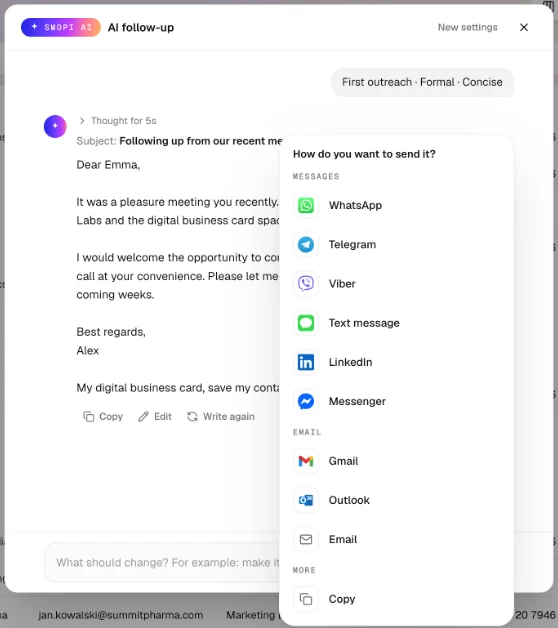
- Send asks how you want to send it. Messages: WhatsApp, Telegram, Viber, Text message, LinkedIn and Messenger. Email: Gmail, Outlook and Email. More: Copy.
WhatsApp, Telegram, Viber and Text message show up when the lead has a phone number, LinkedIn when the lead has a LinkedIn profile, and the email options when the lead has an email address. WhatsApp, Text message, Gmail, Outlook and Email open with the text filled in. For Telegram, Viber, LinkedIn and Messenger, Swopi copies the text and you paste it into the chat.
In the box at the bottom you can type what to change, for example "make it shorter" or "suggest a meeting time". Swopi AI then sends a new version. New settings takes you back to purpose, tone and length.
#Add your booking link
If your Swopi card has a Calendly, Chili Piper, Cal.com or other booking link, Swopi AI invites the lead to pick a time and adds your link under the email.
In the follow-up window, Meeting link shows the link Swopi found on your card. Switch off Add my booking link to leave it out of this email. In the mobile app, Swopi adds the link the same way.
No booking link on your card yet? Add a Calendly or Chili Piper link, or a website link to your booking page in Cal.com, SavvyCal, HubSpot Meetings, Google Calendar or Microsoft Bookings.
#What AI uses
AI uses the lead's name, job title and company, the company details from enrichment and your note from the meeting. The more specific your note, the more personal the email. It writes in the language you use in the dashboard. If you have a Swopi card, it adds a link to it at the end.
You also find AI follow-up in the mobile app.